Voulum 0.5.0 · for macOS
Every app gets a fader.
Your Mac has one volume for everything. So the call is too quiet, the music is too loud and some tab is playing an ad. Voulum puts a small mixing desk in your menu bar and hands each app its own channel.
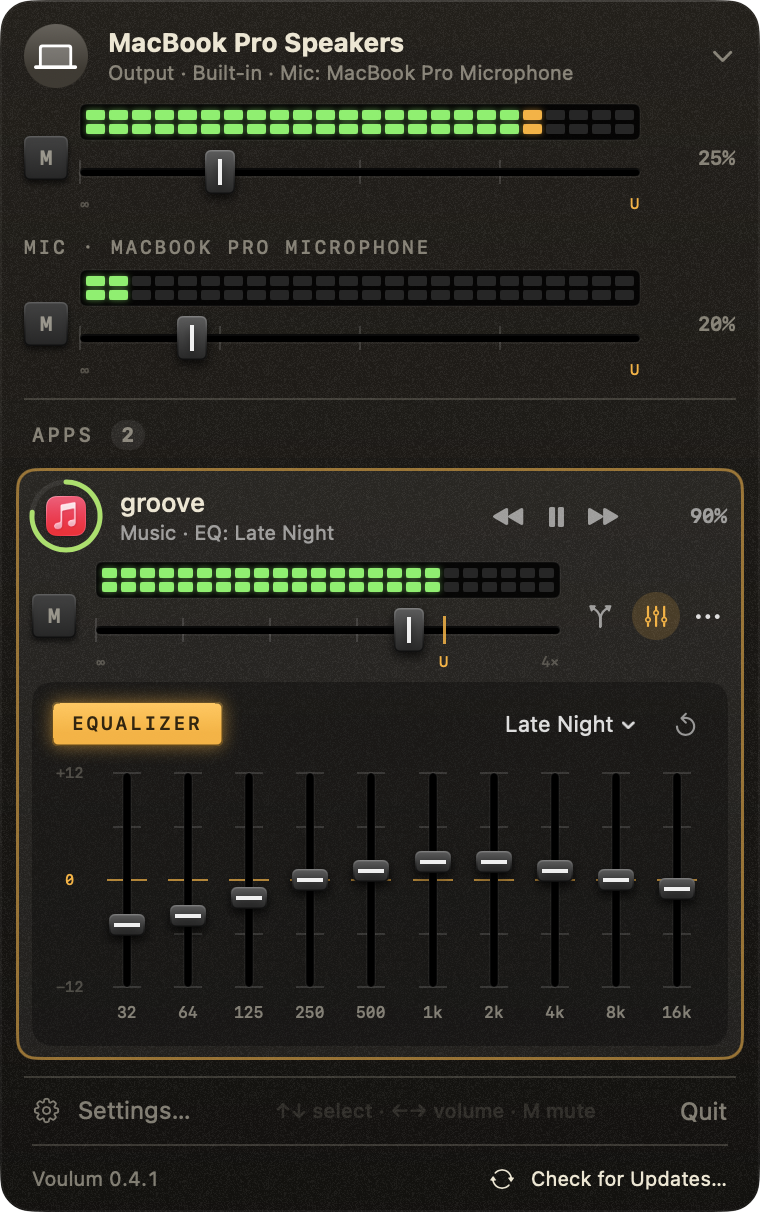
Mixing Desk style, Music playing with the Late Night preset. Frosted and Liquid Glass are one click away.
The real thing lives in your menu bar.
Click the icon and the desk opens: the output, your mic and every app making sound, each on its own channel. What you see on the meters is measured on the audio itself.
- 1Master What actually reaches the speakers, left and right.
- 2Mic Your microphone's level, its input volume and a mute key.
- 3Ring Lights with each app's sound. That's how you find the tab that started playing by itself.
- 4Double LEDs Left on top, right below, measured on that app's audio.
- 5M Mutes the channel and lights red.
- 6U 100%. The fader catches there and the trackpad clicks. Past it, up to 4×.
- 7Graphic EQ Ten bands, ±12 dB, twenty presets, save your own.
Graphic EQ
Ten faders per app.
Every app gets its own equalizer. Pull the bass out of a call, add some to the music, keep the voice clear on a podcast. Try a preset or drag the bands.
Drag a band · double-click to zero
Spec sheet
- Gain per app
- Mute to 400%
- Meters
- Left and right per app, master and mic
- Outputs per app
- Any device, or several at once
- When a device drops
- Falls back to the system output, returns by itself
- EQ
- 10 bands per app · 20 presets · save your own
- Now playing
- Spotify, Apple Music, VLC, browser tabs (Safari, Chrome, Arc, Opera, Flecha)
- Control
- Global shortcuts · arrow keys in the popup · voulum:// URLs
- Look
- Mixing Desk, Frosted or Liquid Glass
- Languages
- English · Português · Español
- Driver
- None. Built on Core Audio process taps
- Recording
- None. Audio never leaves your Mac
- Updates
- Signed, automatic (Sparkle)
- Price
- $0 · MIT license
Signal path
No driver. Nothing recorded.
macOS 14.4 lets an app pick up another app's audio (a process tap). Voulum takes each app's sound there, runs it through its channel and hands it to the outputs you chose. It all happens in memory, as it plays.
- Latency
- one audio buffer
- When a device drops
- back to the system output, returns by itself
- Apps you don't touch
- left alone
Patch it into anything
Every control has a URL, so Shortcuts, Raycast, a Stream Deck or a shell script can work the faders too.
open "voulum://volume?app=Spotify&level=40"open "voulum://route?app=Music&device=AirPods,MacBook%20Pro%20Speakers"open "voulum://eq?app=Spotify&preset=Late%20Night"open "voulum://mute?app=Safari"FAQ
Questions, answered.
How do I change the volume of one app on my Mac?
macOS only has one volume for everything. Install Voulum, click its icon in the menu bar and drag the fader of the app you want. Each app goes from mute to 400%, and Voulum remembers the level per app.
Is Voulum free?
Yes. Voulum is free and open source under the MIT license. There's no account, no ads and no paid tier.
Does it need a virtual audio driver?
No. Voulum uses Core Audio process taps, added in macOS 14.4. There's no kernel extension or driver to install. Quit Voulum and every app goes straight back to normal.
Which macOS versions does it run on?
macOS 14.4 Sonoma or later. The Liquid Glass popup style needs macOS 26.
Can I play one app on AirPods and another on the speakers?
Yes. Each app can go to any output, or to several at once. If a device disconnects, the app falls back to the system output and returns by itself when the device comes back.
Does Voulum record my audio?
No. macOS asks for audio capture permission because that's how a process tap works, but Voulum only plays the sound back to your devices with your volume, EQ and routing applied. Nothing is saved or sent anywhere, and apps you haven't changed are never tapped.
How do I install it with Homebrew?
Run brew install lucianodiisouza/voulum/voulum. That adds the tap and installs the app. After that, brew upgrade voulum works, or let the app update itself.
Can I control it from Shortcuts, Raycast or a script?
Yes. Every control has a voulum:// URL, like voulum://volume?app=Spotify&level=40, plus global keyboard shortcuts for volume, mute and the popup.
Turn down the right thing.
Free, open source, notarized. Updates itself.
Download for MacFree · MIT · notarized by Apple · macOS 14.4+